




 By
By The best 3D scanner for you is the one fits your specific needs. In this 3D scanner buying guide, we outline 3D scanner pricing, the factors that influence 3D scanner price, key points to consider when choosing a scanner, and essential questions to ask to help you navigate the wide array of options on the market.
3D Scanner Price Ranges
There are mainly three categories of 3D scanner price range and the prices depend on different factors such as accuracy and scan size of the 3D scanner.
- Consumer-grade 3D scanners are generally used for hobbyist 3D modeling, gaming, educational purposes. They can range from hundreds of dollars, which are typically small, handheld scanners or those that use photogrammetry with smartphones, to thousands of dollars which can provide higher resolution and accuracy.
- Professional 3D scanners are typically used for high-resolution scanning of smaller to medium-sized objects, such as jewelry, sculptures, product prototypes, or automotive parts. Their prices vary by level of accuracy and scanning speed.
- Industrial 3D scanners are built to handle large-scale, high-precision tasks, and are used in industries such as aerospace, automotive, construction, manufacturing, heritage preservation, and medical imaging. The pricing for industrial 3D scanners can vary greatly, typically ranging from $25,000 to $100,000+ depending on the technology, precision, scan size, and specialized features required for industrial applications.
| Consumer | Professional | Industrial | |
|---|---|---|---|
| Price Range | $100-$5,000 | $5,000-$25,000 | $25,000-$100,000+ |
| Typical Users | hobbyists, makers, small businesses | designers, researchers, engineers | manufacturers, industrial engineers |
| Use Cases | basic 3D modeling, personal projects | prototyping, reverse engineering, small-medium object scanning | large-scale component scanning, quality control, factory-level inspection |
| Brand/Product | Creality CR, Peel, Shining 3D EinScan | Artec Eva, Artec Micro | Artec Leo, Artec Ray, Artec Space Spider, Zeiss ATOS Q, Zeiss T-SCAN hawk 2, GOM Scan 1 |
If you want to get instant access to the latest price of the 3D scanners, check out our 3D scanner price list.
What are the Main Factors that Affect 3D Scanner Prices?
Often, accuracy and resolution are what set apart a hobbyist or consumer-grade 3D scanner from a professional or industrial one, and are among the main factors impacting the price of a scanner.
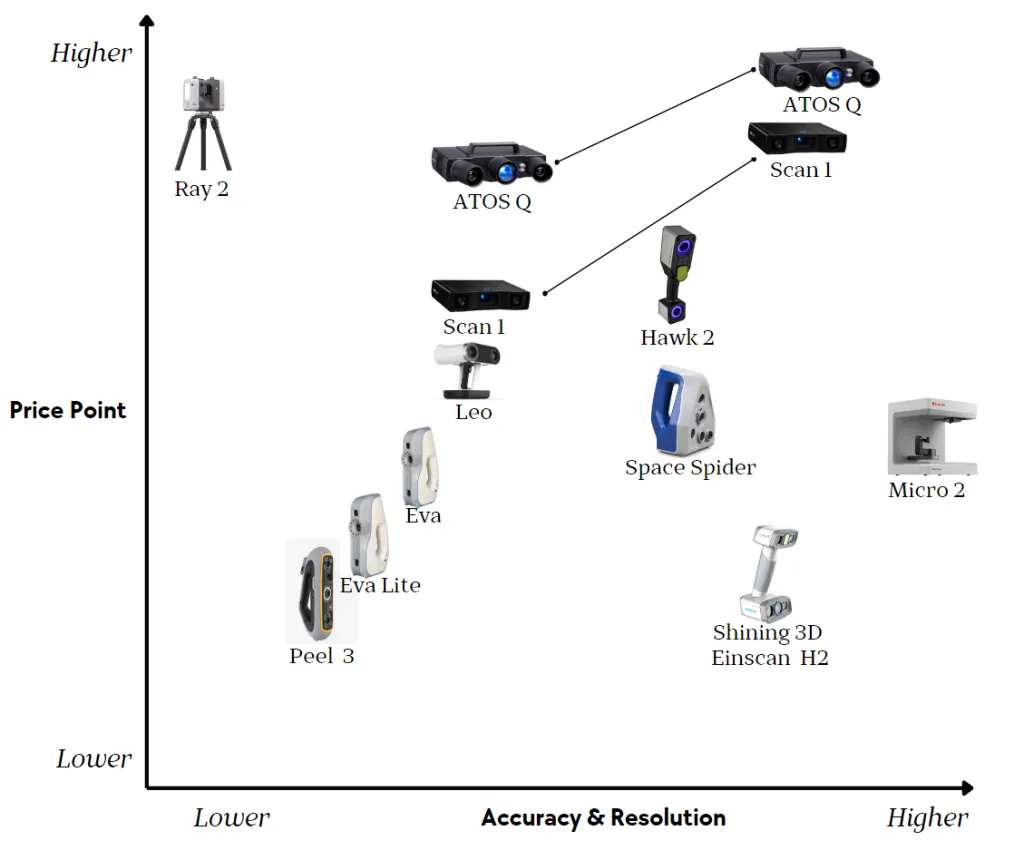
Accuracy & Resolution vs Price of 3D scanners
Below is the specification of resolution, accuracy and starting prices of different 3D scanners:
| Micro II | Space Spider II | ZEISS GOM Scan 1 | Atos Q | T-Scan Hawk II | Eva Lite | Eva | Leo | Ray II | |
|---|---|---|---|---|---|---|---|---|---|
| Resolution | 0.01mm | 0.05mm | 0.037mm-0.129mm | 0.029mm-0.152mm | 0.05mm | 0.2mm | 0.1mm | 0.1mm | 3mm-12mm |
| Accuracy | 0.010mm | 0.05mm + 0.3mm/m | ±0.007mm- ±0.027mm | ±0.005mm- ±0.018mm | 0.02mm + 0.015mm/m | 0.1mm + 0.3mm/m | 0.1mm + 0.3mm/m | 0.1mm + 0.3mm/m | 1.9mm-5.3mm |
| Price | $$ | $$$ | $$$ | $$$$ | $$$$ | $$ | $ | $$$ | $$$$ |
*The Resolution and Accuracy of ZEISS GOM Scan 1 and Atos Q vary depending on different measuring volume
How does a 3D scanner work?
3D scanners use internal cameras as well as lights or lasers to capture the shape of physical objects or an environment. Once a series of still images is captured, they are imported into your computer, and the software creates a digital representation of the subject to work on.
Here is an overview of how some different types of 3D scanners work:
Structured light scanners
These scanners project a light pattern (like grids, dots, or strips) onto the subject’s surface. The cameras on the scanner capture the deformation of the pattern on the object. The software can use that deformation to calculate the surface contours of the object.
Once imported into scanning software, the surface of the part is digitally displayed as a “mesh” made out of tiny triangles. Structured light scanners are often used for small parts, from coins to cars.
LiDAR scanners
Light Detection and Ranging – abbreviated as LiDAR, this scanning technology is also referred to as “laser 3D scanning” which sends a laser beam to the surface of an object. The scanner’s sensor then detects the reflected light of the laser beams, measuring the time it takes for the laser to return or the angle of reflection, and thus get the distance between the scanner and the object. As the scanner’s angle changes, these distances form a “point cloud”. LiDAR scanners are often used for larger scanning subjects, like boats and bridges.
Photogrammetry
This method involves taking multiple photographs of the object from different angles. Software analyzes these images to detect common points and reconstruct the 3D shape through a process called triangulation. Photogrammetry is commonly used in artistic applications where absolute accuracy is less critical. In these cases, it’s often most important to capture visual details.
What is a 3D scanner used for?
3D scanning is widely used across different sectors, such as manufacturing, medical, automotive, forensic, and fashion industry, mainly serving three types of applications: reverse engineering, inspection, and replication.
Reverse engineering
In the manufacturing industry, there are often key components that are hard to access, lack documentation or digital files, or were made by manufacturers that are no longer around. Reverse engineering helps by recreating or improving these parts. It achieves this by analyzing them with technologies like 3D scanning to understand their design and functionality.


To get a virtual 3D scan of a fuel injector to assist with the design of grippers, Wisconsin-based STS Technical Group used a Creaform laser 3D scanner. The scanning eliminated the time it would have taken to measure every gap, cylinder, and opening on the fuel injector. They then used a Formlabs Form 3 SLA 3D printer for prototyping and manufacturing of the new gripper.
Inspection
In industries where parts need to perform as designed and meet stringent criteria, 3D scanning can help verify and ensure product quality and consistency in a much more efficient way. 3D scanners can quickly assess complex shapes and features that might be difficult or time-consuming to measure with traditional methods.
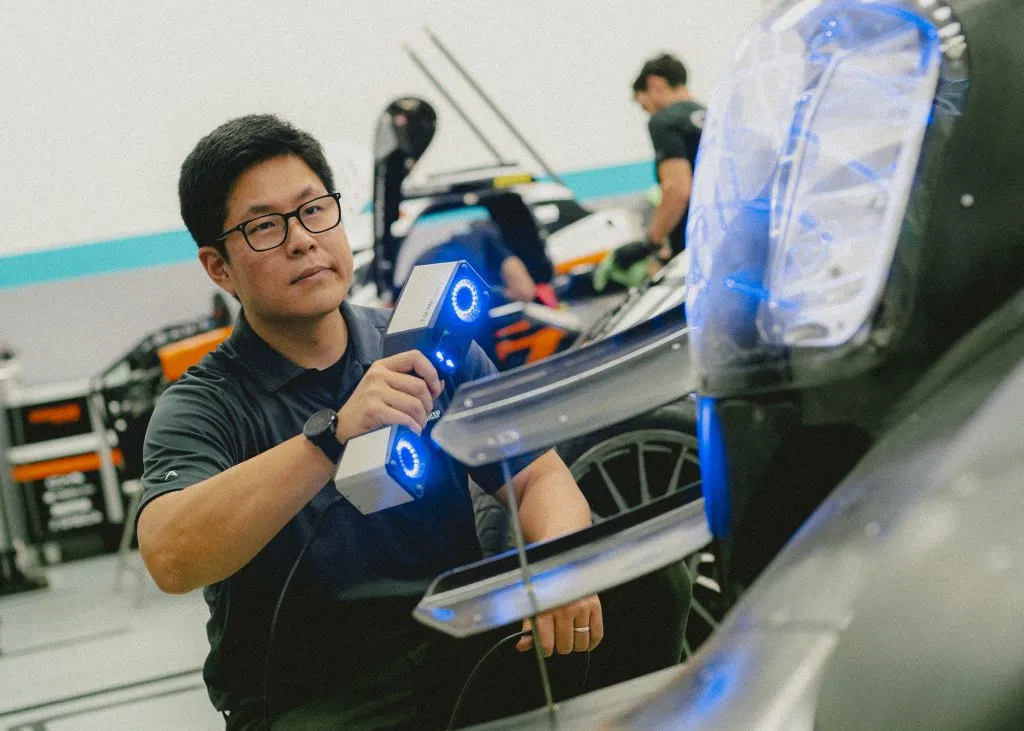
For example, our TriMech engineer used the Zeiss ATOS Q to successfully scan a shiny, thin sheet metal part that has very small surface, thin surface wall, and outer edges and holes. ATOS Q is the absolute gold standard for accuracy and precision in 3D scanning and quality assurance metrology.
Replication
Much like reverse engineering, 3D scanners capture precise details of an object’s surface to create a digital 3D model. After being edited and refined using software, the digital model is used to guide various manufacturing processes, particularly in industries such as healthcare, fashion, and art and entertainment.

Restorer Mattia Mercante uses an HP 3D Structured Light Scanner to reconstruct the missing decorations of a frame and then replicated the missing pieces on a Formlabs 3D printer. The prints were colored in gold to appear identical to the original decorations. Compared to handcrafting, the restoration required minimum CAD modelling, being much faster and affordable.
How to choose the right 3D scanner?
When selecting the best 3D scanner, it’s important to determine which factors are most crucial for your specific needs:
- Scan Volume
- Accuracy & Resolution
- Scan Speed
- Portability
- Ease of Use
- Post Processing Software
- Support System
Scan Volume
When narrowing down your options for a 3D scanner, the first question to consider is the size of the objects you’ll be scanning. Will you be working with small, detailed items, or larger, more complex objects? The range of scanning volumes available can vary significantly, as illustrated in the following chart.
| Object Size | Micro II | Space Spider II | ZEISS GOM Scan 1 | Atos Q | T-Scan Hawk II | Eva Lite | Eva | Leo | Ray II |
|---|---|---|---|---|---|---|---|---|---|
 | * | * | * | * | |||||
 | * | * | * | * | * | ||||
 | * | * | * | * | * | * | * | ||
 | * | * | * | * | * | ||||
 | * |
If you are seeking to digitize small, intricate objects such as jewelry, desktop metrology systems like Artec Micro II are a great choice. This compact 3D scanner is designed to handle objects ranging from the size of a tooth to a softball, making it ideal for inspection and reverse engineering in office and laboratory settings. It boasts the highest resolution of 10 microns within Artec’s lineup.

Artec Micro II
Conversely, if your focus is on large-scale objects, Artec’s Ray II LiDAR scanner is a popular option. It can scan objects ranging from the size of a motorcycle to a warehouse. Mounted on a tripod, this scanner can be placed in various locations within a space to ensure comprehensive scanning from all angles without losing its place.

Artec Ray II
To understand the volume a 3D scanner can handle, you might want to look at its Field of View (FoV), which indicates the area the scanner can capture in a single scan. Most models can reasonably be used on a target up to 3x the field of view. A larger FoV can facilitate quicker scanning of large objects but comes with trade-offs in resolution or accuracy.
Many structured light systems offer adjustable fields of view. For instance, the ZEISS GOM Scan 1 scanner provides three different measuring volumes, while the ATOS Q scanner offers five options by changing out the lenses.

ZEISS GOM Scan 1
For extremely large and complex objects, it may be necessary to use multiple scanners to capture the entire object, including smaller and more difficult-to-reach areas. Artec Studio allows data from multiple scanners to be combined in a single project. For example, you could scan a person’s body with an Artec Leo, then scan their face with an Artec Space Spider, and combine both into a single result.
Accuracy & Resolution
The next question after considering the object size is: what degree of accuracy and resolution do you require in your scans?
But before diving into that, let’s clarify the difference between accuracy and resolution in a 3D scanner.
| Accuracy | Resolution | |
|---|---|---|
| Definition | Accuracy is the error between the scanned part and the actual physical part.
| Resolution is the level of detail that the sensor can acquire. It describes the smallest space between points on an object’s surface, the granularity of the captured surfaces.
|
| Implication | It reflects how closely the 3D model reflects the true dimension, shape, and details of the scanned object. | Higher resolution shows small details more clearly but won’t necessarily guarantee dimensional accuracy.
|
| When to prioritize? | Accuracy is critical when precise dimensions and alignment are essential. In manufacturing, automotive, aerospace, and medical space, ensuring that scanned models exactly replicate the original is crucial for creating functional parts and making design modifications. The resulting part must fit precisely and be free from distortion. | Resolution takes precedence in scenarios where capturing fine surface details and textures is essential, such as in art, VR/AR, jewelry, gaming, and forensic analysis. It could also be critical when you need to locate small details like mounting holes on a relatively larger part.
|
| Specifications | Look for a stated “Volumetric Accuracy” or similar specifications that include error buildup over distance. | Two specifications about resolution are Point-to-point distance and Points per scan. Smaller Point-to-point distance means the points are denser, and more details are captured. While bigger Points per scan mean more points are scanned within a fixed distance. |
Scan Speed
Now that you’ve tackled the two most important questions, the next question to consider is: How important is scanning speed for your projects? Are you working on a product with a tight time-to-market deadline? Is efficiency a crucial factor for you?
If you are scanning serial parts for quality control, particularly when dealing with large surfaces, scanning speed might be the most critical factor to consider.
Different manufacturers use various terms to describe scan speed. For instance, a handheld 3D scanner might measure speed in frames per second, similar to a video recorder. For a laser 3D scanner, you’ll want to consider the acquisition speed (usually given in points per second) and the frequency (the number of laser lines captured per second).
It’s important to consider how the Field of View and scanning speed combine to determine how long your part takes to scan. Other factors like setup and post-processing can also impact your overall time spent.
Portability
Do you need a mounted or handheld 3D scanner? Or is a desktop stationary 3D scanner able to meet your needs?
A mounted scanner is best for high-volume scanning or large objects, like aircraft or factory components. A handheld scanner offers flexibility and access to hard-to-reach areas where a stationary scanner might not fit.
Typically, stationary scanners are more accurate because they capture still images, while handheld scanners capture moving frames. However, some handheld models, like the Artec Space Spider II and Zeiss T-Scan Hawk II, offer comparable accuracy and resolution. These versatile scanners balance accuracy, versatility, and speed.

Artec Space Spider 3D scanning a skull at the University of Toronto – Photo credit – Johnny Guatto
For instance, the Artec Space Spider, with an accuracy of 0.05mm and a resolution of 0.1mm, is ideal for scanning intricate details on large objects that are impossible to scan with the desktop Artec Micro. It’s often used in conjunction with long-range scanners like the Artec Ray for comprehensive coverage.
The Artec Leo is the only fully cordless handheld 3D scanner on the market that could amplify the benefits of a portable scanner. With 6 hours of battery life and Wi-Fi connectivity, Artec Leo offers the freedom of 3D scanning. You can see the 3D replica being built in real time on Leo’s touch panel screen as you scan your object.
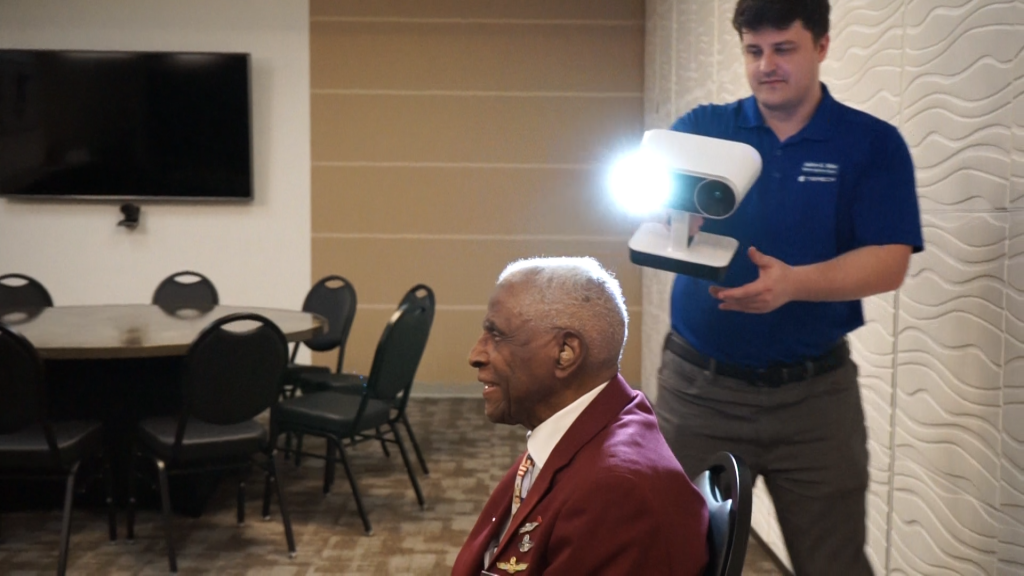
TriMech engineer scanning the Tuskegee Airmen with Artec Leo
Ease of use
When assessing the user-friendliness of a 3D scanner, it’s important to consider the accessories. For instance, handheld 3D scanners typically require a PC connection during the scanning process. Scanners such as the lightweight, cable-free Artec Leo offer an exceptionally intuitive workflow, making 3D scanning as simple as recording a video.
Software is another crucial factor. After capturing raw data and converting it into a point cloud with the scanner’s software, you’ll need additional software to turn this data into meshes and CAD models. This involves basic post-processing tasks like smoothing surfaces, filling gaps, and aligning, as well as more advanced processing for certain applications. Additional software packages are often necessary to achieve a refined final 3D model.
Ease of use is tricky to quantify, as it depends on a variety of factors that will differ depending on what you’re scanning. Many videos exist online that show each scanner’s operation and can help inform a buyer, but you may want to get a more personal assessment. Our company offers a consultation with an Application Engineer and offers a demonstration to help you find the tool that best suits your specific needs.
Post Processing software
Most scanners will come with a software package that will export a mesh file such as STL or OBJ. For some applications this will be all you need. However, many will require an additional software package to further convert this mesh into usable data.
Reverse engineering software helps convert mesh data into CAD models that will work in programs like SOLIDWORKS, Inventor, or CATIA. The software acts as a sort of translator from one data type to another. Examples of Reverse Engineering Software include Geomagic for SOLIDWORKS or Design X.
QA software packages like Zeiss Inspect, Polyworks, or Control X are used to check the dimensions of scanned parts for problems. They can virtually replicate the function of touch probe instruments (like Coordinate Measurement Machines or CMM’s) that are commonly used in Quality Control labs. This is why many 3D scanners are marketed as “touchless CMMs”.
Support System
Knowing what kind of training, support, and maintenance service you will get after purchase ensures optimal performance of your 3D scanner.
A good support system include:
- Technical assistance such as setup, calibration, and troubleshooting.
- Software guidance that helps you navigate tools and understand their features and updates.
- Training resources that maximize the scanner’s capabilities.
- Maintenance and repairs that ensure good working condition of the scanner and a maximized lifespan.
FAQ
Q: Can I scan shiny, reflective, or clear surfaces?
A: 3D Scanners use light to take measurements, so these surfaces can be challenging. These kinds of tasks will require that you coat the surface with a temporary opaque coating before the scan. Scanning spray like AESUB eliminates this problem, if you’re permitted to use them.
These sprays disappear after a few hours and require no cleanup. If coating the surface is not an option for your application, don’t be afraid to ask your vendor if they can do a benchmark scan of a sample part. Scanners are often adjustable to ensure they capture a variety of surfaces.
Q: Can the 3D scan be compatible with SOLIDWORKS (or any CAD program like Creo, Inventor, etc.)?
A: While most CAD programs boast the ability to import 3D scanned mesh data (STL, OBJ, or other similar files), they generally can’t do much with such a scan. Reverse Engineering software like Geomagic is usually necessary to translate the scan into a more CAD-friendly format.
Q: Can I 3D print a copy of a part that I’ve scanned?
A: Since 3D printers generally require an STL type file to print, it is possible to immediately print a copy of a part you’ve scanned. But beware, your scan may not reflect all the exact properties of the part that you want reproduced. The 3D scanner can only capture surfaces where it has direct line of sight, thus your scan may not fully capture holes and deep pockets. For many parts, additional editing of the scanned geometry will be required.
Q: Can I use my iPhone or iPad as a 3D scanner?
A: Some phones are capable of generating meshes, just a like a scanner. The accuracy and usability of the results depend on which app you choose. Photogrammetry software might be an option for creating a 3D model from photos. The latest Artec Studio 19 software has an AI photogrammetry feature that can create 3D models with photos or video from a smartphone – You can now 3D scan with your phone using the Artec Studio 19 as free trial!
Conclusion
When choosing the best 3D scanner for your needs, consider the following questions: What’s the object size? Is the scanner accurate enough for me? Does it need to be handheld or wireless? Is it easy to use? What’s the software included? What’s the support offered by the vendor?
If you want to know more based on your specific needs, please contact our experts.

Written by Sophie Jin
Sophie (Huiyu) Jin is an SEO/PPC Specialist at TriMech, where she focuses on digital marketing strategies for their additive manufacturing and CAD business units.
Prior to joining TriMech, Sophie worked as a business journalist both in Canada and China, covering various industries, particularly tech companies.
Related TriMech Solution
Learn more about the solutions featured in this Article:
Sorry, we couldn't find any posts. Please try a different search.
Need a Quote for Advanced Manufacturing?
Contact a TriMech manufacturing expert today and get answers to your questions
Related Content
More advanced manufacturing content from the TriMech team