




 By
By Flexible 3d printer filament, like TPU filament, is more resilient to tear and wear than rigid filament. Unlike common filament such as PLA or ABS, flexible filament offers great adhesion between layers and great elasticity.
Before selecting the right flexible filament for your 3D printer, you should consider a few questions. What types of flexible filament are out there? Can your FDM printer handle these filaments? What settings should be adjusted? What key factors should you consider when choosing a flexible filament?
This article will explore these topics in detail, with insights from our experts.
Key Takeaways:
- Flexible filaments are ideal for functional parts needing rubber-like qualities, such as gaskets, toys, and wearable accessories.
- Among all the different types of flexible filament, TPE is the most significant one as it generally offers greater elasticity and resilience.
- Many people favor TPU filament for its balance of flexibility and strength, bridging the gap between rubber and plastics.
- Choose flexible 3D printing filament based on the specific application needs, considering flexibility, tensile strength, and abrasion resistance for the best results.
- Flexible 3D printing filament tends to deform, making it harder to print than rigid filaments like ABS or PLA.
- Choose the right printer setup. Adjust settings such as extruder temperature, print speed, and retraction. This will help ensure successful prints. Testing with temperature towers can help fine-tune these settings.
What is Flexible 3D Printer Filament?
Flexible 3D printer filament is a blend of plastics and rubber. It is elastic and melt processable with FDM printers, generally less rigid than traditional filament like PLA or ABS. It is a broad category of various types of bendable and compressible filaments including thermoplastic elastomer (TPE), flexible PLA, specialized Nylon, and elastomeric filament. The flexibility can range from moderately flexible to extremely soft.
Among all the different types of flexible filament, TPE is the most significant one as it generally offers greater elasticity and resilience compared to most flexible filaments. TPE has several subcategories that offer various properties, including TPU, TPS, and TPC.

Flexible materials: TPE and TPU
Today when people talk about flexible 3D printer filament, they often mention TPU filament. It is favored for the balance of flexibility and strength, bridging the gap between rubber and plastics.
What are flexible 3D printer filaments used for?
Flexible 3D printer filaments are used in a variety of applications where flexibility, stretchability, or compressibility is required – though not necessarily the same elasticity or resilience of true elastomers.
These are the most frequent usage of flexible filaments:
| Benefits of flexible 3D printer filament | Applications of flexible 3d printer filament |
|---|---|
| Durable yet flexible | Functional parts such as gaskets and seals |
| Bend, stretch or compress repeatedly without breaking | Hinges, toys |
| Absorb shocks and vibrations | Phone cases, dampener, pressure fit connections |
| Adapt to various shape and movement | Custom foot orthotics, knee braces, wearable accessories |
Pros & Cons of flexible 3D printer filament
| Pros of flexible 3D printer filament | Cons of flexible 3D printer filament |
|---|---|
| Flexible and elastic | Can be difficult to print with due to their tendency to deform or get stuck in the extruder |
| Resistant to abrasion and impact | Can be more expensive compared to standard rigid filaments like PLA or ABS |
| Resistant to oils, greases, and solvents | Most materials have limited UV resistance |
Pros and Cons of flexible 3d printer filament
Ideal for applications needing rubber-like qualities, flexible 3D printer filament is generally more difficult to print with compared with more rigid filament like ABS or PLA:
- Its softness makes it prone to bending and kinking in the extruder which can lead to messy prints or require additional cleanup.
- Printing can be slower and require more precise handling.
- Some flexible filaments may have poor bed adhesion or may not stick well to the build plate, leading to potential warping or detachment during printing.
- Some flexible filaments may sag or deform under its own weight while bridging.
Types of flexible 3D printer filament
Flexible 3D printing material is often classified by Shore Hardness. This measures the amount of force required to create a certain indentation. In other words, Shore Hardness indicates the material’s hardness, with higher numbers meaning greater hardness and lower numbers indicating more flexibility.
There are three kinds of scale of Shore Hardness:
- Shore 00: typically measures foams, gels and rubbers that are very soft
- Shore A: normally used for softer rubber
- Shore D: reserved for harder and semi-rigid plastics and rubbers
Below is an often-cited chart that shows the comparison among different scales of Shore Hardness. The ranges sometimes overlap. For example, Shore 80A is almost equivalent to Shore 30D.

Shore Hardness Scale
The following chart shows the flexibility and elasticity of the several main types of flexible filaments. TPU and TPA(particularly PEBA) are normally more flexible and elastic compared to TPC and flexible PLA.
| Flexible 3D Printer Filament | Shore Hardness (Flexibility) | Elongation at Break (Elasticity) |
|---|---|---|
| TPU | 60A-98A | 300%-600% |
| TPC | 85A-100A | 350%-530% |
| TPA (PEBA) | 70A-95A | 350%-500% |
| Flexible PLA | 90-95A | 300% |
Flexibility and Elasticity of flexible 3D printer filament:
TPU vs TPC vs TPA vs Flexible PLA
TPU (Thermoplastic Polyurethane) filament
TPU is the most common type of TPE used in 3D printing.
TPU filament is favored for:
- Highly flexible and durable, good balance of hardness and elasticity
- Strongly resistant to abrasion and ideal for enduring repeated stress, significant wear and tear
- Greater rigidity and easier to print with compared to other derivatives of TPE
Below are some of the interesting prints our expert printed using the TPU92A and on one of the F123 Series printers(F170, F190CR, F370, F370CR).
-
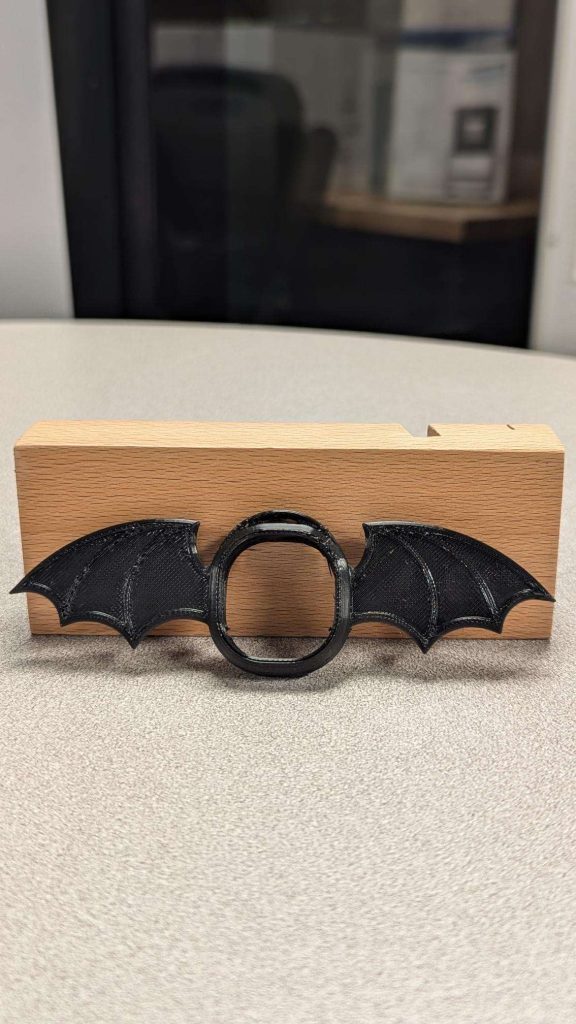
- A design concept for a key chain smart watch holder
-
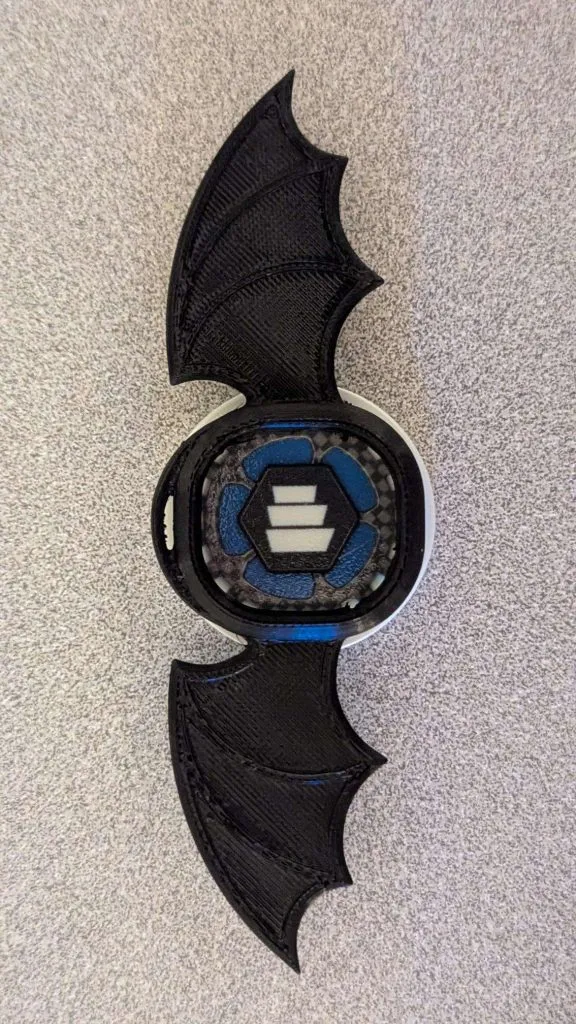
- A smart watch cover laid on top of a poker chip printed on the J55
-
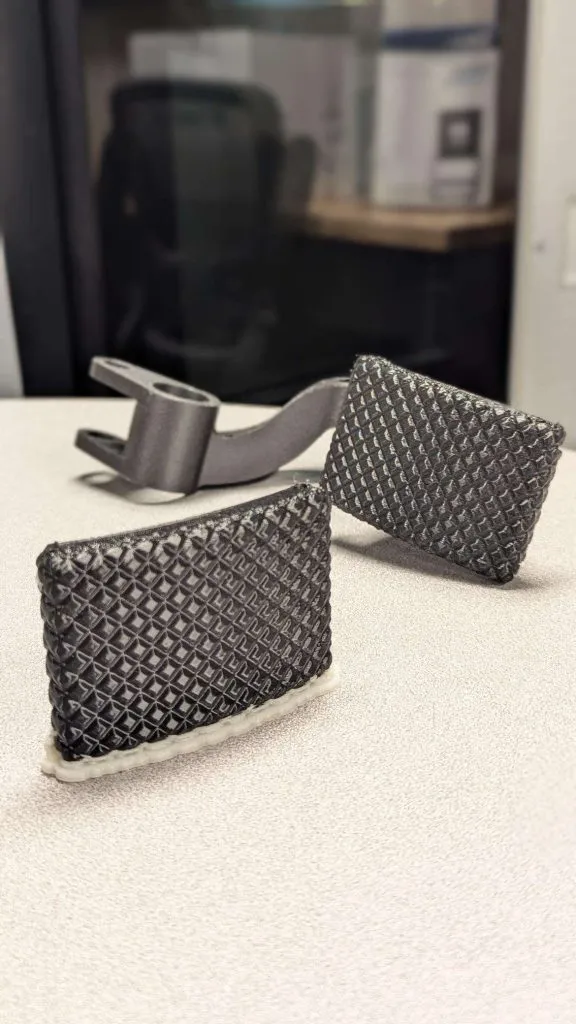
- TPU Brake pedal cover printed on the F170
-
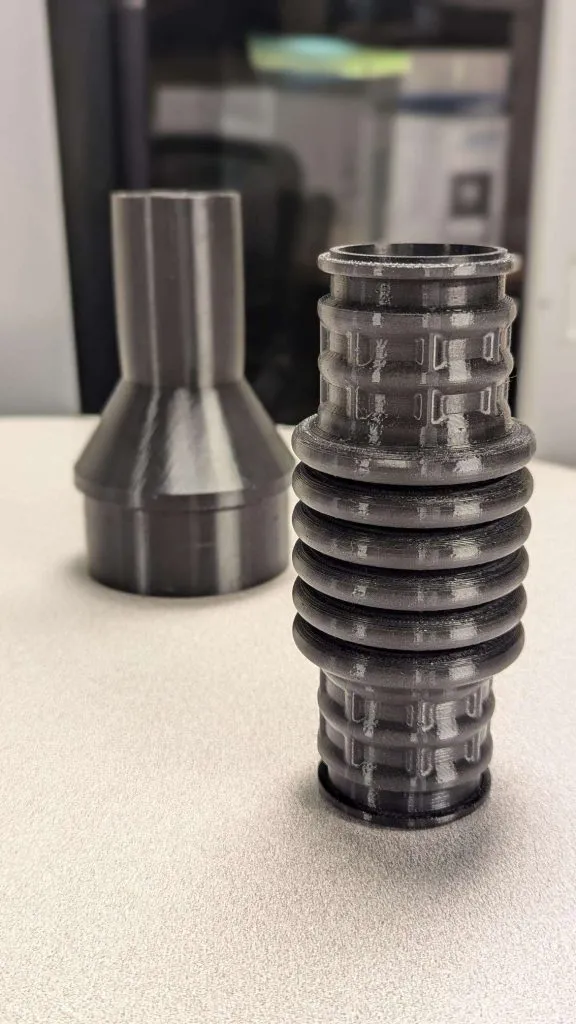
- Two different flexible air intake hose adapters
TPC (Thermoplastic Copolyester) filament
TPC filament has a Shore Hardness ranging from 85A to 100A, being less flexible compared to TPU but may be more resilient in certain applications.
It’s often used for engineering applications that require high-end 3D printers mainly because it:
- Decent temperature resistance, chemical resistance, and UV resistance
- Has great balance of flexibility and rigidity, suitable for parts like enclosures to protect from shock
- Require precise control over printing conditions such as temperature and extrusion speed
TPA (Thermoplastic polyamide elastomers) filament
TPA is a co-polymer that merges TPE and flexible nylon. It combines the properties of TPE that is flexible and elastic and flexible Nylon that is abrasion resistant and chemically stable. This makes TPA ideal for functional parts that need to be durable and less dense.
As a variant of TPA, PEBA (Polyether Block Amide) has a flexibility that similar to TPU filament, though it may not always match TPU in terms of durability. It is the most popular form of TPA for:
- Excellent balance of durability and flexibility
- Low density
- Better resistance to sunlight and chemicals
- Remains flexible at low temperature, making it suitable for applications such as ski boots and wire insulation coatings
Flexible PLA filament
Flexible PLA, also called soft PLA, is a flexible variant of polylactic acid (PLA). It takes away the brittleness of standard PLA, being more flexible than standard PLA but not as flexible as TPU.
It could act as a tough rubber that is suitable for rigid and durable applications such as tire prototypes.
Compared to other flexible filament, flexible PLA filament is easier to print, with much fewer issues like stringing or clogging.
Similar to most of the TPE filament and regular PLA filament, flexible PLA filament doesn’t do well under long-term UV exposure.
Best Practices for Printing with Flexible Filament
As mentioned above, printing with flexible filament can be trickier than using rigid filament, so it’s important to do a thorough preparation and adjust print settings before you start printing.
Hardware settings
Extruder type
Compared with direct-drive printers where the extruder is mounted directly on the print head, Bowden setups, which use a long tube to feed filament to the extruder, are often even more challenging with flexible materials because of the increased distance and potential for filament bending. Direct-drive extruder provides better control over flexible filaments and reduces the risk of jams because the filament path is shorter and more direct.
Extruder temperature
When printing with flexible filament, the extruder temperature plays a crucial role in achieving successful prints.
If the temperature is too high, the filament tends to become too fluid, leading to oozing or stringing. The printed part may become too soft and prone to warping or deformation.
If the temperature is too low, the filament not fully melting will cause gaps and weak spots in the print, and bonding between layers will also be poor. This results in a weak and unstable print. Lower temperatures can make filament harder to work with, potentially leading to print failures.
It is important to refer to the filament manufacturer’s recommendations and start with a test print to fine-tune the temperature settings. Perhaps print a temperature tower before jumping right in!
Print speed
Printing with flexible material require slower print speeds compared to rigid filament. Typical print speed is around 20mm/s but always check the filament manufacturer’s recommendation. Keep it slow especially at the beginning.
Bed adhesion
Flexible filaments can be prone to warping or shifting, so good adhesion is crucial.
Bed temperature help with bed adhesion and minimize warping. Use a heated bed if possible, with temperatures ranging from 40°C to 60°C.
For some filaments, a heated bed isn’t always necessary. If your 3D printer does not have a heated bed, consider using adhesion aids like glue sticks, painter’s tape, or specialty adhesion sprays.
| Flexible 3D Printer Filament | Extruder Temperature(°C) | Bed Temperature (/th> | Print Speed (mm/s) |
|---|---|---|---|
| TPU | 210 – 230 | Unheated – 60 | 5 – 30 |
| TPC | 230 – 260 | 90 – 110 | 5 – 30 |
| TPA | 220 – 230 | 30 – 60 | 5 – 30 |
| Flexible PLA | 190 – 230 | 40 – 60 | 10 – 30 |
Hardware settings for printing with flexible 3D printer filament:
TPU vs TPC vs TPA vs Flexible PLA
Retraction
Excessive retraction with filament moving in and out of the nozzle repeatedly can lead to jams. To minimize stringing and oozing, retraction distances should be minimal, often between 0.5mm and 2 mm, and retraction speed should be slower, under 20mm/s.
Layer height
Use a standard or slightly thicker layer height compared to what you might use for rigid filaments. Typical layer heights range from 0.1 mm to 0.3 mm, depending on the desired resolution and the specific filament’s capabilities. So always check manufacturer’s recommendations for the specific filament.
Pro-tips for printing with flexible filament
Since many TPEs are hygroscopic, it’s wise to store them in an airtight container with desiccant until you’re ready to print.
There are numerous options for flexible 3D printer filaments on the market today. In this sea of options, the Stratasys TPU92A filament available on the F123Series printer family provides validated print settings through the slicing software GrabCAD Print Pro with which you don’t have to modify settings.
The only physical printer setup for using TPU92A necessary is to install the TPU specific print head and load the material. These things allow users to skip the hassle of tinkering with print settings and jump straight to using an industry proven solution that can reliably produce quality parts time and time again at the push of a button. This saves valuable engineering time and money on printing, and focus on making innovative designs for new products.
Buying Guide for Flexible 3D Printer Filament
Your choice of flexible filament should be based on the applications and specific needs of your prints, thus the properties, mainly flexibility and durability, of the filament should be the major factors to consider.
As mentioned above, flexible filaments come in different hardness levels, often measured in Shore A or Shore D. The lower the number, the more flexible the material is. You should determine how stretchy or bendable you need the filament to be for your application.
At the same time, look at the tensile strength of the filament if your print needs to withstand significant load. For parts that will experience wear and tear, check if the filament has good abrasion resistance.
Overall, you should consider if the material will meet your desired balance of flexibility and durability.
Generally:
- Flexibility: PEBA > TPU > Soft PLA > TPC
- Durability: TPU ≈ PEBA > TPC > Soft PLA
For high-performance and flexibility, PEBA and TPU are excellent choices that could endure repeated stress. PEBA is more resistant to chemicals and UV light compared to TPU.
Soft PLA are better for less demanding applications such as decorative items, custom fittings and prototypes where extreme flexibility or durability is not required. It is also easier to print with.
TPC offers a balance between flexibility and rigidity. It can handle moderate levels of wear and tear, though it may not be as flexible as TPU or as impact-resistant as PEBA.
Overview of popular flexible 3d printer filament
| Company | Filament | Material | Shore | Appx. Price |
|---|---|---|---|---|
| Stratasys | FDM TPU 92A | TPU | 92A | $18/kg |
| Raise3D | Premium TPU | TPU | 95A | £68.00/750g |
| Ultimaker | TPU | TPU | 95A | £64.25/kg |
| Bambu Lab | TPU 95A | TPU | 95A | $55/kg |
| Big Rep | TPU | TPU | 98A | $57.5/kg |
| Kimya | TPC-91A, PEBA-S, TPU-92A | TPC, PEBA, TPU | 91A, 93A, 92A | £33 – £62/750g |
| NinjaTek | NinjaFlex, Cheetah, Eel, Chinchilla, Edge | TPU, TPE | 75A – 95A | €44/kg |
| Polymaker | PolyFlex | TPU | 90A – 95A | $28/750g |
| Forward AM | Ultrafuse | TPU | 85A | $60/750g |
| Fillamentum | Flexfill | TPU, TPE, PEBA | 90A – 98A | €46.25 -€140.82/kg |
| Recreus Filaflex | Filaflex, Reciflex, Conductive | TPU | 60A – 98A | $50 – $160/kg |
| FormFutura | FlexiFil, Python Flex | TPC, TPU | 40D, 98A | €55.55/kg – €63.32/kg |
FAQ’s
Q: Is TPU filament better than PLA filament?
The answer is dependent on your application. If you need a quick inexpensive prototype for general shape and look, PLA will do the trick. When it comes to having flexibility and rubberlike quality for an end use part, or even just a functional prototype of a rubberlike component, TPU will be the optimal choice.
Q: What are the drawbacks of TPU filament?
The main drawback to FDM printed TPU filament is its final surface finish. While it creates a fantastic functional part, when used in the FDM world, layer lines can be more visible when compared to other materials on the market.
As well as it can tend to jam, even in a direct drive head, from time to time even when following all the recommended print settings. This can usually be overcome by keeping the material in a cool, dry, airtight container when not actively printing; and ensuring a consistent material flow form the extruder prior to beginning a build. Link to
Q: What should I do to ensure safe printing with TPU filament?
For safety recommendations it is best to refer to the specific material manufactures guidelines. In general, it is best to 3D print in a well-ventilated area that is climate controlled between 60°F-85°F (15°C – 30°C) with 30-70% humidity for best results.
Q: Can all 3D printers use TPU filament?
Not all printers on the market can use TPU. Technically you could load the material into any open source FDM machine, but without the proper printing conditions your success may be limited. It is best to ensure that you have the appropriate temperatures, speeds, and overall environment prior to printing with TPU.
Conclusion
Flexible 3D printer filament, particularly TPU and its variants, offer unique advantages for applications requiring durability and elasticity. While they present challenges during the printing process, understanding the specific characteristics and requirements of different filaments can greatly enhance print quality and application effectiveness.
By considering factors such as Shore Hardness, compatibility with your printer, and optimal print settings, users can successfully harness the potential of flexible filaments for a wide range of innovative designs.

Written by Sophie Jin
Sophie (Huiyu) Jin is an SEO/PPC Specialist at TriMech, where she focuses on digital marketing strategies for their additive manufacturing and CAD business units.
Prior to joining TriMech, Sophie worked as a business journalist both in Canada and China, covering various industries, particularly tech companies.
Related TriMech Solution
Learn more about the solutions featured in this Article:
Need a Quote for Advanced Manufacturing?
Contact a TriMech manufacturing expert today and get answers to your questions
Related Content
More advanced manufacturing content from the TriMech team