





 By
By To get the best results of FDM 3D printing, you need to not only to take care of your printer but also remember to store your 3D printer filament properly. In times of extended shutdowns, or simply long hiatuses between prints, it’s imperative to store material properly.
What Happens if 3D Printer Filament aren’t Stored Properly?
If 3D printer filament such as PLA and ABS are not stored properly, multiple problems can occur which can result in poor print quality. When exposed to harmful elements for long periods of time such as moisture, heat and UV rays, the following problems can occur: air bubbles, increased brittleness and breakage, diameter augmentation, hissing steam during printing, a higher temperature needed during extrusion, and weakening of the tensile strength. In some cases, the material may not even load properly.
General Storage Tips for 3D Printing Materials
While different 3D printing materials each have their own storage recommendations to ensure that the material is capable of peak performance, there are some general guidelines to make sure to follow when storing any 3D printing material:
Keep dry
Most thermoplastics like PLA and ABS are shelf-stable for the most part, but because these filaments are made of polymers, they are hygroscopic by nature, which means they can absorb water molecules in the environment. Actually, moisture is one of the biggest culprits in causing 3D printing materials to degrade over time. Both filament and resin can absorb water from the air, and this can cause serious print issues such as popping, weakening, clogging, and warping.
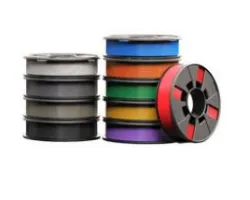
You always want to be sure to keep the material stored in a cool, dry environment, with a means of controlling the temperature such as a thermostat. Materials that are especially sensitive to moisture include Nylon, PLA, TPU, etc.
Avoid UV exposure
UV exposure can cause degradation of Polymer chains, bleach out pigments, accelerate oxidation, and lead to faster moisture absorption.
Use the oldest material first
Always observe material expiration dates, making sure to use the oldest material first, and to never use expired material in the printer. This could result in parts with a subpar performance, or even damage your machine.
Read datasheet for special instruction
Every material is different and will react differently over time. Even the same type of material made by two different suppliers can have subtle differences, although the same best practices typically still apply. This is why it is always good to read the material’s datasheet for any special instructions.
How to Store 3D Printer Filament
Thermoplastics material spools should be stored in mylar bags when not in use to prevent the material from absorbing any moisture, as this can affect the print quality.
In addition to being stored in mylar bags, each material spool contains desiccant packs stored in the inner race, which help prevent the material from absorbing moisture. Storage bags should be sealed tight with the air removed.
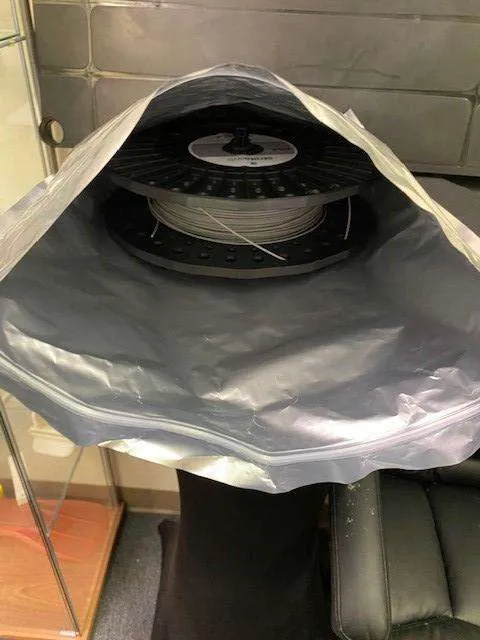
If a mylar bag is not available, a space saving storage back with a vacuum suction port can be used.
3D printer filament like Stratasys Fortus Plus and Fortus Classic canisters should be stored vertically as shown in the image below to prevent the material from cross-winding inside the canister.
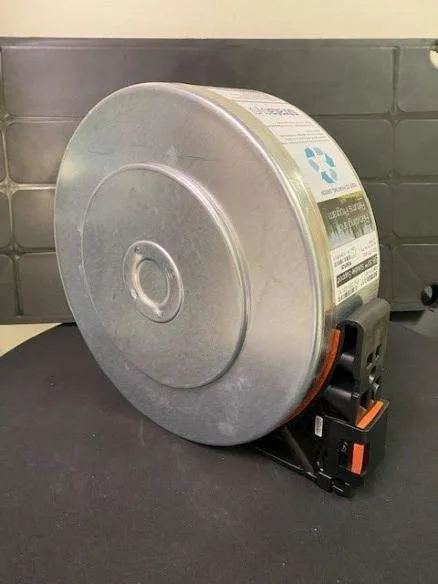
When materials are removed from the printers and ready to be stored until their next use, it is important to replace both orange rubber seals, to prevent any unwanted moisture from entering the canister.
To sum up, these are best practices for storing 3D printer filament:
- Store the materials in their original packaging, if possible. Alternately, you can store the materials in a sealed bag, airtight container, or mylar bag. For added protection long-term you can add desiccants, which absorb moisture that might get into the container.
- Keep the materials stored in temperatures between 65° and 75° F. High temperatures can break down the filaments.
- Store in a room without exposure to direct sunlight. (If you’re keeping materials in an opaque bag, box or container, this is less of an issue)
- Store in a dry environment. (less than 50° relative humidity)
Extra pro-tip: in addition to proper material storage during extended periods of time without being used, it is important to use head cleaning and shutdown wizards appropriately to help maintain the health and longevity of your 3D printer. These wizards are easily accessible under the Options tab on the main screen of the host computer.
Conclusion
Proper storage of your 3D printer filament such as ABS and PLA is crucial in creating high-quality prints for your 3D printing projects and making sure you get your money’s worth by having them last as long as possible. Being aware of these simple tips can help, but it is always important to know the properties of any of your 3D printing materials to ensure that you are printing high-quality prototypes.
When printers and materials are not in use for extended periods of time, it is important to take proper care of them to ensure their longevity. By abiding by storage protocols, being aware of material expiration dates and using shutdown and cleaning wizards when appropriate, you can avoid wasting usable material, and prevent potential damage to your machine.

Written by TriMech Marketing
TriMech Manufacturing, a division of the global TriMech Group, is a strategic technology and business solutions paartner for designers, engineers, and manufacturers.
With a legacy spanning decades, the division focuses on helping clients design, build, and deliver products faster through a comprehensive ecosystem of manufacturing tools and expertise.
Related TriMech Solution
Learn more about the solutions featured in this Article:
Need a Quote for Advanced Manufacturing?
Contact a TriMech manufacturing expert today and get answers to your questions
Related Content
More advanced manufacturing content from the TriMech team